




Contents
.htaccess Files
About
.htaccess files are used to override the default settings in the Apache config file. This gives the flexibility to use different settings for different projects running on the same web server. When the .htaccess file is placed in a document directory, its directives are applied to that directory and all subdirectories thereof.
Syntax Sample
AuthType Basic
AuthName "Password Required"
AuthUserFile /www/passwords/password.file
AuthGroupFile /www/passwords/group.file
Require Group admins
Comments
Add comments using the # symbol
# this is a comment
Restricting Access
Sample – Require Password
authtype basic
authgroupfile /dev/null
authuserfile /home/content/41/6586741/htconfig/.htpassword.ghtpassword
authname "Secure Area"
require user colej1
authname
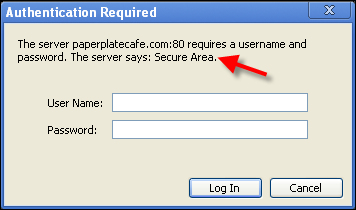
The authname command is used to deliver an on-screen message to the user attempting to access the directory:
authname "Secure Area"
Deny All Files & Folders
Create an .htaccess file with the code below to block a folder and all of its contents from being publicly accessible. A user will not be prompted for a username and password; errors will be returned as if files and folders did not exist.
deny from all
Redirects
Redirecting Individual Pages
The example below redirects http and https versions of 31bits.com/shop/bitsies.html to 31bits.com/bitsies/
RedirectMatch 301 ^/shop/bitsies.html$ /bitsies/
Redirect All Pages To WWW Prefix
Add the code below to the site's .htaccess file in order to 301 redirect all visits from http://domain.com/ to http://www.domain.com. Works for all site pages.
RewriteCond %{HTTP_HOST} !^www. [NC]
RewriteRule ^(.*)$ http://www.%{HTTP_HOST}/$1 [R=301,L]
Redirect All Pages To Non-WWW Prefix
Add the code below to the site's .htaccess file in order to 301 redirect all visits from http://www.domain.com/ to http://domain.com. Works for all site pages.
RewriteCond %{HTTP_HOST} ^www. [NC]
RewriteRule ^(.*)$ http://%{HTTP_HOST}/$1 [R=301,L]
File Permissions
Generally speaking, there are two categories that need to be considered when viewing file permissions: actions and user groups.
Actions
Actions your site's plugins and files can make are:
Read– allows access to a file to view its contents onlyWrite– allows the file to be changedExecute– gives access to a file in order to run the programs or scripts that are contained in it
User Groups
The user groups of the actions can be:
User– you as the owner of your siteGroup– other users that can also have access to the files you choose such as the members of your siteWorld– anyone with an internet connection who tries to view your files
File Permissions
File permissions are primarily viewed as three consecutive numbers. The greatest amount of access you can grant is 777 where the user, group and world have access to read, write and execute files. The least amount of access you can give – besides none at all – is with a file's permission set to 444 where everyone can only read the file.
First number– the access to file actions granted to theuserSecond number– the file access given to thegroupThird number– the amount of file access given to theworld
To come up with these numbers, a value is given to each possible action combination:
0– no access1– execute2– write3– write and execute4– read5– read and execute6– read and write7– read, write and execute
FTP & SSH Permissions
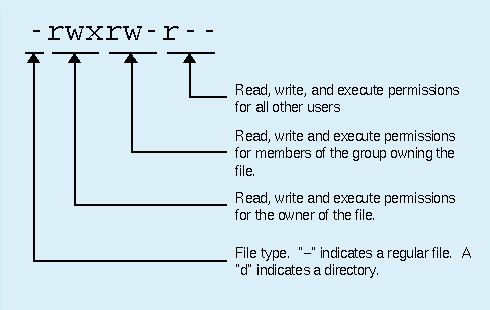
File permissions are written differently when viewing them through FTP or SSH (Shell access). They may look something like this:

The letters represent the actions for the permission: Read, write and execute. Hyphens represent the absence of an action, except for the first character in the sequence which shows the permission is for a file. If it were for a folder (directory) there would be a letter "d" instead. The characters that follow are grouped in sets of threes. The first set represents the user, the second set for group and the third for world.
Helpful URL's
| Category | Description | URL |
|---|---|---|
| Tutorial | How To Create & Edit the .htaccess File | http://www.makeuseof.com/tag/how-to-easily-create-and-edit-htaccess-file-for-you... |
| Utility | .htaccess - File Generator | http://htaccesser.apacheblog.de/index-nojs.php |
| Reference | .htaccess - Files | http://httpd.apache.org/docs/1.3/howto/htaccess.html |
| Reference | .htaccess - Creating a Redirect | http://kb.mediatemple.net/questions/242/How+do+I+redirect+my+site+using+a+.htacc... |
| Tutorial | File Permissions | http://premium.wpmudev.org/blog/understanding-file-permissions/ |
